
 Kanban Columns
Moving Cards Through the Workflow
Kanban Columns
A kanban board is an agile project management tool designed to help visualize work. Kanban boards use cards and columns to help service teams get work done. Each column represents a specific activity that together compose a workflow. Cards flow through the workflow until completion. You can use the Column Icons in the detailed card view to move cards through the workflow or you can drag and drop the cards through to completion.
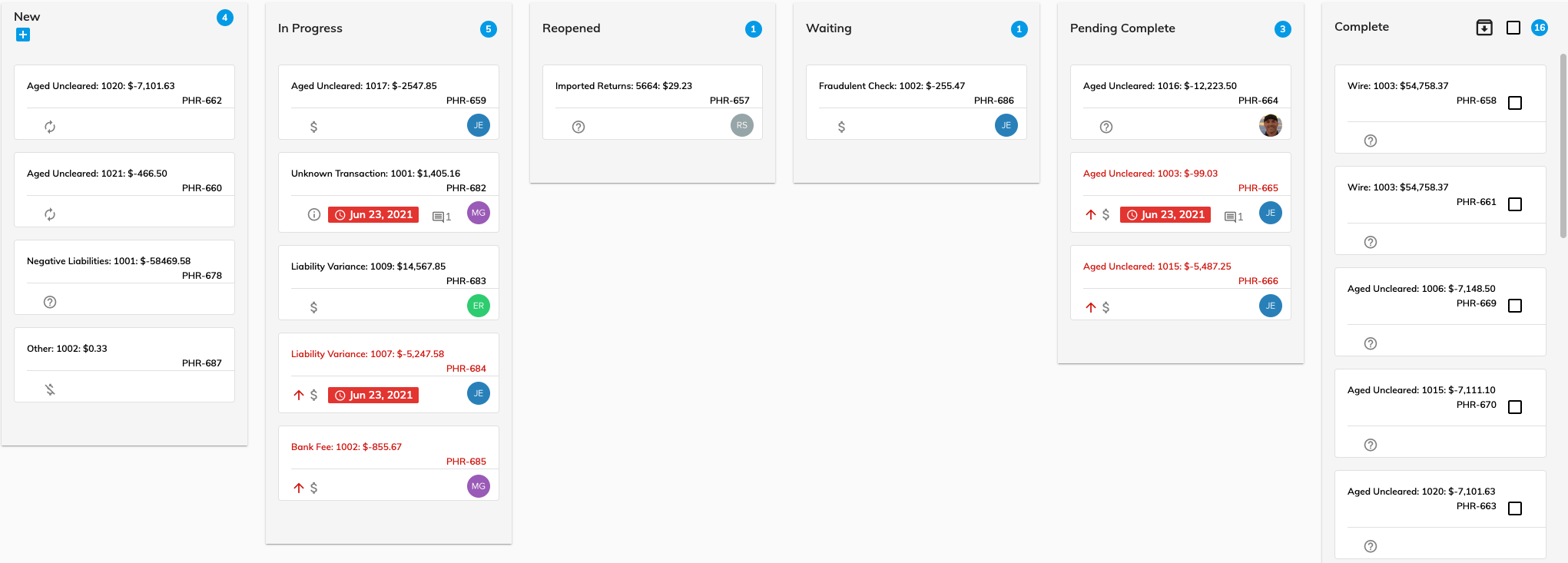
Suggested uses for the columns are as follows:
- New. When cards are added to the kanban board, they are automatically added to the New column. These cards represent the backlog of work.
- In Progress. When a team member starts working on a card, they can drag it from the New to the In Progress column to indicate that the item is being worked on.
- Reopened. If an item was expected to resolve but remains an issue, move it from the Pending Complete back to Reopened to indicate that more work needs to be done.
- Waiting. Use this column if you are waiting for another department or event, such as another payroll to process.
- Pending Complete. Move Subledger Reconciliation Items (system generated cards) to the Pending Complete column when you think you have done everything necessary to resolve the item. The next time you "Find Variances" on the Workflow, if the resolution is complete, Assure will suggest that these cards be closed (******see Pending Resolved).
- Completed: Use this column for cards that are considered to be resolved. User generated cards can be moved to the Completed column manually, while you should allow the Pending Resolved workflow tab to dictate whether Subledger Rec items are actually resolved.
© RAKE Digital Company, 2022 • Updated: 11/22/21
Comment or report problem with topic