
 Organization Report
Organization Report
You can use the Organization Report tab to report on users and user activity.
User Report
On the top half of the screen, you will see a list of users, including email, name, phone number, role, and MFA status.

This list can be viewed on the screen or the information can be downloaded to a csv file.
MFA Status
The MFA column indicates the user's current multi-factor authentication status. Multi-factor authentication is automatically enabled on all new users. This requirement cannot be modified by an administator. When the user is added and before the user logs in, the MFA status will be set to Enabled. Once the user successfully logs in and sets up their multi-factor authentication method, the status will update to Enforced.
User Activity Report
Changes to users are logged in and activity report.
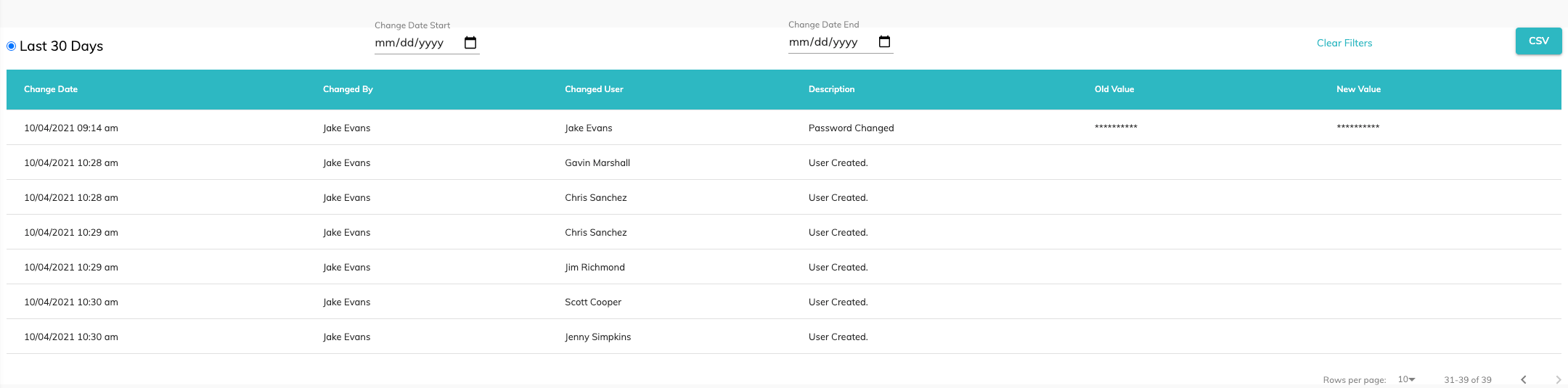
Information included in the report is:
- Change Date: Date and time the change to the user record occurred.
- Changed By: User who changed the user record.
- Changed User: User whose record was changed.
- Description: Description of change.
- Old Value: Old value of modified field, if applicable (passwords are masked).
- New Value: New value of modified field, if applicable (passwords are masked).
The report defaults to display the last 30 days of changes. The report can also be filtered for change start and end dates.
The information can be displayed on the screen or downloaded to a csv file.
© RAKE Digital Company, 2022 • Updated: 12/06/21
Comment or report problem with topic